Overview
adaptix_meditation is a production-grade, premium Flutter architecture
boilerplate tailored for high-performance meditation and wellness applications.
Built entirely using GetX State Management, it handles responsive rendering, state persistence, and gorgeous ambient audio UI flows out of the box.
Key Core Capabilities
- Smooth Audio Architecture: Integrated audio engine framework setup
powered by
just_audiofor effortless play, pause, and track controls natively linked with visual waveforms. - Persistent User Framework: Local storage via
shared_preferenceshandles saving of app states, volume configurations, and favorite track lists seamlessly. - Ultra-Responsive Adaptation: Dynamically integrated via
flutter_screenutilallowing flawless mathematical scaling across small compact phones, flagships, and tablets. - Typography & Visual Engine: Pre-bundled with
google_fontsandiconsaxconfigurations for clean modern aesthetics.
Application Visual Preview
Below are representative screenshots captured directly from the live working application:
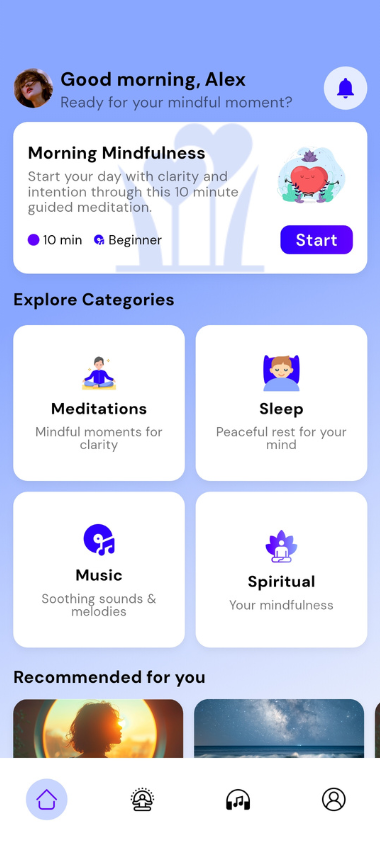
Home & Navigation Dashboard
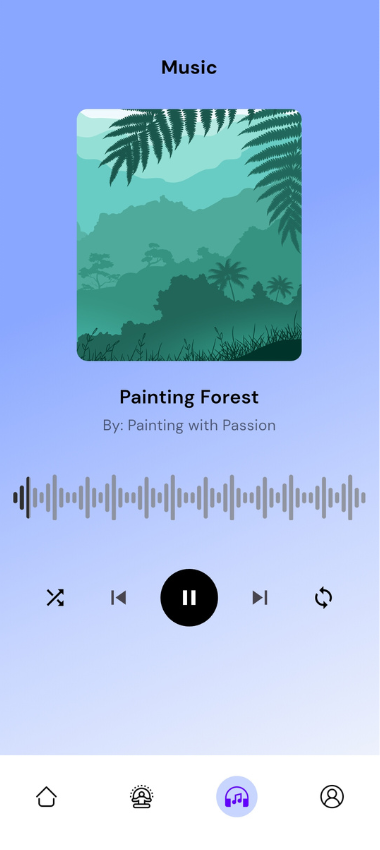
Audio Player View with Waveforms
Quick Initial Verification
Run these initial diagnostic commands inside your terminal root environment to launch the application instantly:
flutter pub get
flutter runSetup & Build Guide
Follow this exact system pipeline to configure your local development architecture and successfully deploy target device packages.
Prerequisite Frameworks
- Flutter SDK (Stable Channel): Supported broadly across Version
3.19.xor later. Verify your active installation usingflutter --version. - Native Packaging Layers: Android Studio (with latest SDK Build Tools) or Xcode compilation instances for iOS environments.
- Java Environment: JDK 11+ configured correctly inside your global environment system path variables.
Local Initialization
# Access project root directory
cd adaptix_meditation

# Trigger system package dependency updates
flutter pub get
Executing Builds & Testing
Launch an active hot-reloadable environment inside your connected device or emulator:
flutter runCompiling Production Distribution Packages
To safely pack highly optimized release builds protected against reverse engineering, use the following compilation targets:
# Build highly optimized Android APK
flutter build apk --release --obfuscate --split-debug-info=build/debug-info

# Build Android App Bundle (AAB) for Play Store deployment
flutter build appbundle --release --obfuscate --split-debug-info=build/debug-info
The resulting binary will settle
inside:build/app/outputs/flutter-apk/app-release.apk
Dynamic Font/Icon Compilation Override
If you encounter runtime rendering problems regarding custom vector indexes, bypass tree-shaking flags during compiler packaging steps:
flutter build apk --no-tree-shake-iconsApplication Customization
Step-by-step instructions to fully customize and white-label this template for your own branding requirements.
1. Changing Application Name & Package Identifier
Android Platform
- App Name: Open
android/app/src/main/AndroidManifest.xml. Locate theandroid:labelproperty inside the<application>tag and change its value:android:label="Your New App Name" - Package ID (Application ID): Open
android/app/build.gradle.kts. Locate theapplicationIdline inside thedefaultConfigblock and update it:applicationId = "com.yourdomain.newname"
iOS Platform
- App Name: Open
ios/Runner/Info.plist. Find the keyCFBundleNameandCFBundleDisplayName, then modify the string beneath them:<key>CFBundleDisplayName</key> <string>Your New App Name</string> - Bundle Identifier (Package ID): Open the project inside Xcode, navigate
to **Runner > Signing & Capabilities**, and edit the **Bundle Identifier** input field.
Alternatively, modify it directly in
ios/Runner.xcodeproj/project.pbxprojby searching forPRODUCT_BUNDLE_IDENTIFIER.
2. Comprehensive Branding & Visual Style Guides
A. Modifying Theme Color Palettes
The entire theme framework points to a centralized matrix declaration file located inside
lib/config/theme/app_colors.dart (or lib/theme.dart). Update hex
pointers to change your colors globally:
class AppColors {
  static const Color primary = Color(0xFF059669);    // Change your primary tone
  static const Color secondary = Color(0xFF10B981);  // Change your accent secondary tone
  static const Color background = Color(0xFFF5F5F5); // App window background canvas
  static const Color surface = Color(0xFFFFFFFF);    // Cards and modal surface tones
}
B. Replacing Static Assets & Branding Logos
- Place your brand logo images inside the physical asset hierarchy at
assets/images/logo.png. - Ensure you maintain uniform file extension types. If changing names, make sure to update their direct resource strings where they are declared in your application layout view trees.
C. Changing Custom Typography Fonts
The system uses google_fonts for robust text styling. To swap the typeface
globally, adjust the base theme adapter setup inside
lib/config/theme/app_theme.dart or lib/app.dart:
// Swapping typography font families safely
final textTheme = GoogleFonts.interTextTheme( // Simply change 'plusJakartaSansTextTheme' to your preferred font
  Theme.of(context).textTheme,
);
3. Automatic Launcher Icons Re-generation
This project uses flutter_launcher_icons workflows to automatically generate all
application app icons across platforms in a single command script.
- Place your new source logo asset icon inside
assets/images/logo.png(Recommended layout resolution: 1024x1024 pixels, non-transparent PNG). - Verify configuration values inside the manifest file
pubspec.yaml:flutter_launcher_icons: android: true ios: true remove_alpha_ios: true image_path: "assets/images/logo.png" - Execute the automatic icon generator pipeline task via terminal commands:
flutter pub run flutter_launcher_icons:main
App Architecture
The codebase complies strictly with clean, feature-separated architectural layers making dependency isolation highly explicit and straightforward to extend.
Central Directory Workspace Map
adaptix_meditation/
├─ android/                # Native Android configuration layers and dependencies
├─ ios/                    # Native iOS configuration settings and asset catalogs
├─ lib/                    # Active Core Flutter Workspace
│   ├─ app.dart            # Root Entry Application Routing Setup and Theme Configurations
│   ├─ main.dart           # Global Main Runtime Launch Initializer Node
│   └─ features/          # Encapsulated Domain Feature Modules
│       └─ play_music/
│           ├─ controller/
│           │   └─ play_music_controller.dart
│           └─ view/
│               └─ play_music_screen.dart
├─ assets/                 # External System Asset Directory
│   ├─ images/            # Graphic design assets, brand logos, background mockups
│   ├─ icons/             # Custom layout vectors, SVG glyph metrics
│   └─ music/             # High fidelity ambient track loops (.mp3 / .ogg formats)
├─ pubspec.yaml            # Package and Asset Resource Manifest configuration descriptor
└─ README.md               # Summary repository user manual
📁 Core Directory Sub-folders Mapping
The lib/core/ layer houses critical structural modules shared globally across
your domain layers:
| Sub-folder | Operational Purpose | Core Baseline Implementations |
|---|---|---|
bindings/ |
Dependency Injection (DI) Management | Loads controller instances safely via ControllerBinder setups. |
common/ |
Global Shared Reusable System Widgets | Houses shared atomic layout UI blocks like buttons, styles, textfields. |
localization/ |
Internationalization and Strings Control | Manages systemic localization parameters through structural adapters. |
models/ |
Structured Domain Data Payload Translators | Maps structural responses natively into readable system data entities. |
State Lifecycle Workflow Model
main.dartfires the system initialization, mounting the controllers using injection blocks viaGet.put()methods.- The user layout view instances automatically access controllers via runtime hooks using
Get.find(). - State mutations track reactive streams (e.g.,
RxBoolobservables) triggering automated widget rendering.
Asset Management
Guidelines to safely manage, declare, and invoke local multimedia objects.
Declaring Assets inside the Manifest
When appending custom audio components or imagery inside the physical disk paths, explicitly
declare them inside the manifest array of pubspec.yaml matching this syntax
format:
flutter:
  assets:
    - assets/images/
    - assets/icons/
    - assets/music/
Executing Asset Pointers within Views
// Invoking Rasterized Bitmaps
Image.asset('assets/images/home_bg.png')

// Loading local high fidelity audio components inside just_audio
final player = AudioPlayer();
await player.setAsset('assets/music/meditation_track.mp3');Troubleshooting & FAQ
Solutions to common build issues and technical questions regarding the development lifecycle.
Common Build Solutions
1. Error: CocoaPods out of date / iOS Build failures
If compiling on macOS platforms for iOS targets and encountering dependency system errors, wipe local caches completely and rebuild your package dependencies:
cd ios
rm -rf Pods Podfile.lock
pod cache clean --all
pod install --repo-update
cd ..
flutter clean
flutter pub get
2. Error: Cryptic caching conflict errors or missing plugin classes
Wipe all dynamic build artifact generation folders and reset localized dependency caching indices using terminal hooks:
flutter clean
flutter pub get
flutter run
3. Error: Target SDK Version conflicts inside Gradle compiler execution runs
Ensure your system matches matching compile requirements. If encountering version mismatches,
double check configurations inside your android/app/build.gradle.kts file:
android {
    compileSdk = 36
    defaultConfig {
        targetSdk = 36
    }
}
Frequently Asked Questions
- Q: How do I update the official Application Version?
A: Navigate topubspec.yamland update theversion:metric value string explicitly (e.g., change1.0.0+1to match1.0.1+2configurations). - Q: Can I add network URLs to the audio streaming player layer?
A: Yes! Simply change the controller's implementation from pointing tosetAsset()setups to utilizing standard network endpoint streamers viasetUrl("https://yourserver.com/track.mp3").
Support & Credits
Need professional integration help or customized extension work?
Get in Touch
- Technical Support Email: adaptixinnovate@gmail.com
- WhatsApp Developer Chat: +8801757474700
- Corporate Workspace Portal: adaptixinnovate.com
Project Metadata Specifications
- Distribution Version: 1.0.0
- Core Publisher Team: Adaptix Innovate
- Licensing Constraints: All Rights Reserved. Protected under Envato Regular/Extended standard code purchase terms.